MobileNetV3
Introduction
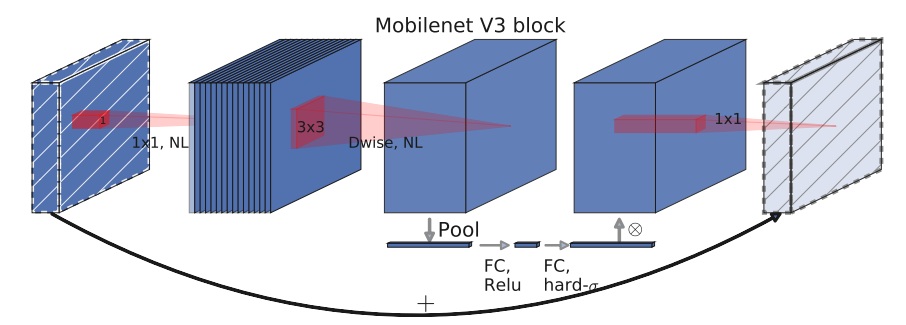
MobileNet v3 was published in 2019, and this v3 version combines the deep separable convolution of v1, the Inverted Residuals and Linear Bottleneck of v2, and the SE module to search the configuration and parameters of the network using NAS (Neural Architecture Search).MobileNetV3 first uses MnasNet to perform a coarse structure search, and then uses reinforcement learning to select the optimal configuration from a set of discrete choices. Afterwards, MobileNetV3 then fine-tunes the architecture using NetAdapt, which exemplifies NetAdapt’s complementary capability to tune underutilized activation channels with a small drop.
mobilenet-v3 offers two versions, mobilenet-v3 large and mobilenet-v3 small, for situations with different resource requirements. The paper mentions that mobilenet-v3 small, for the imagenet classification task, has an accuracy The paper mentions that mobilenet-v3 small achieves about 3.2% better accuracy and 15% less time than mobilenet-v2 for the imagenet classification task, mobilenet-v3 large achieves about 4.6% better accuracy and 5% less time than mobilenet-v2 for the imagenet classification task, mobilenet-v3 large achieves the same accuracy and 25% faster speedup in COCO compared to v2 The improvement in the segmentation algorithm is also observed.
Results
| Model | Context | Top-1 (%) | Top-5 (%) | Params (M) | Train T. | Infer T. | Download | Config | Log |
|---|---|---|---|---|---|---|---|---|---|
| MobileNetV3_large_100 | D910x8-G | 75.14 | 92.33 | 5.51 | 225s/epoch | model | cfg | log | |
| MobileNetV3_small_100 | D910x8-G | 67.34 | 87.49 | 2.55 | 118s/epoch | model | cfg | log |
Notes
All models are trained on ImageNet-1K training set and the top-1 accuracy is reported on the validatoin set.
Context: GPU_TYPE x pieces - G/F, G - graph mode, F - pynative mode with ms function.
Quick Start
Preparation
Installation
Please refer to the installation instruction in MindCV.
Dataset Preparation
Please download the ImageNet-1K dataset for model training and validation.
Training
Hyper-parameters. The hyper-parameter configurations for producing the reported results are stored in the yaml files in
mindcv/configs/mobilenetv3folder. For example, to train with one of these configurations, you can run:# train mobilenetv3_large_100 on Ascend cd mindcv/scripts bash run_distribute_train_ascend.sh ./hccl_8p_01234567_123.60.231.9.json /tmp/dataset/imagenet ../configs/mobilenetv3/v3_large_Ascend.yaml
Note that the number of GPUs/Ascends and batch size will influence the training results. To reproduce the training result at most, it is recommended to use the same number of GPUs/Ascneds with the same batch size.
Detailed adjustable parameters and their default value can be seen in config.py.
Validation
To validate the model, you can use
validate.py. Here is an example for mobilenetv3_large_100 to verify the accuracy of your training.python validate.py -c configs/mobilenetv3/v3_large_Ascend.yaml
Deployment (optional)
Please refer to the deployment tutorial in MindCV.